Building Northscore
A system design case study
There was no single place to follow Canadian sports. So I built one.
Northscore is a Progressive Web App that delivers live stats, standings, and aggregated media across Canadian leagues — all from a single codebase.
Watch the product in action
The Product
Northscore is a Progressive Web App that delivers live stats, standings, and aggregated media across 50+ Canadian leagues — including CFL, CEBL, CHL, CPL, USPORTS, CCAA, and individual sports like USports track and field. It runs on iOS, Android, desktop, and even Meta Quest without requiring app store approval.
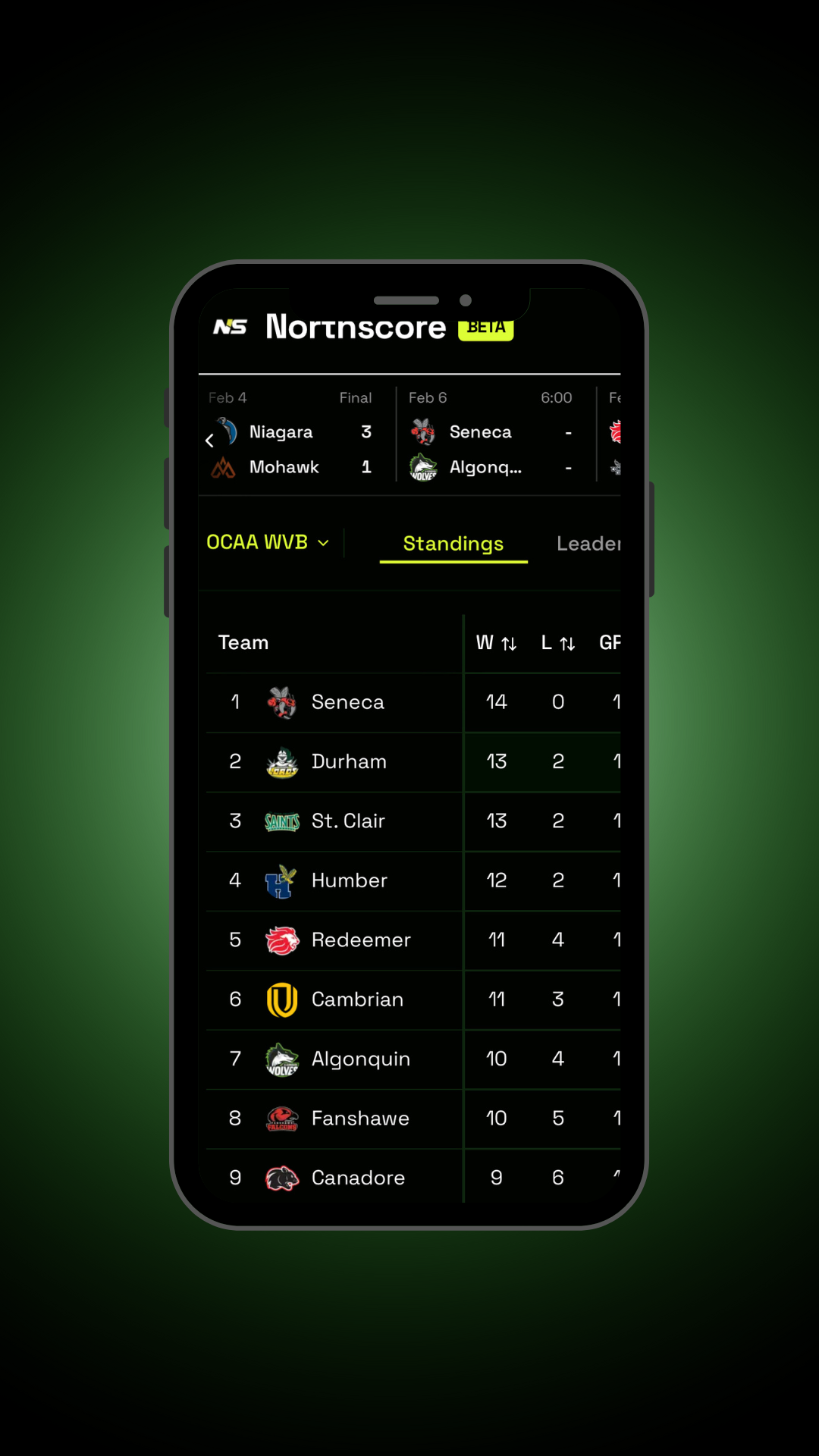
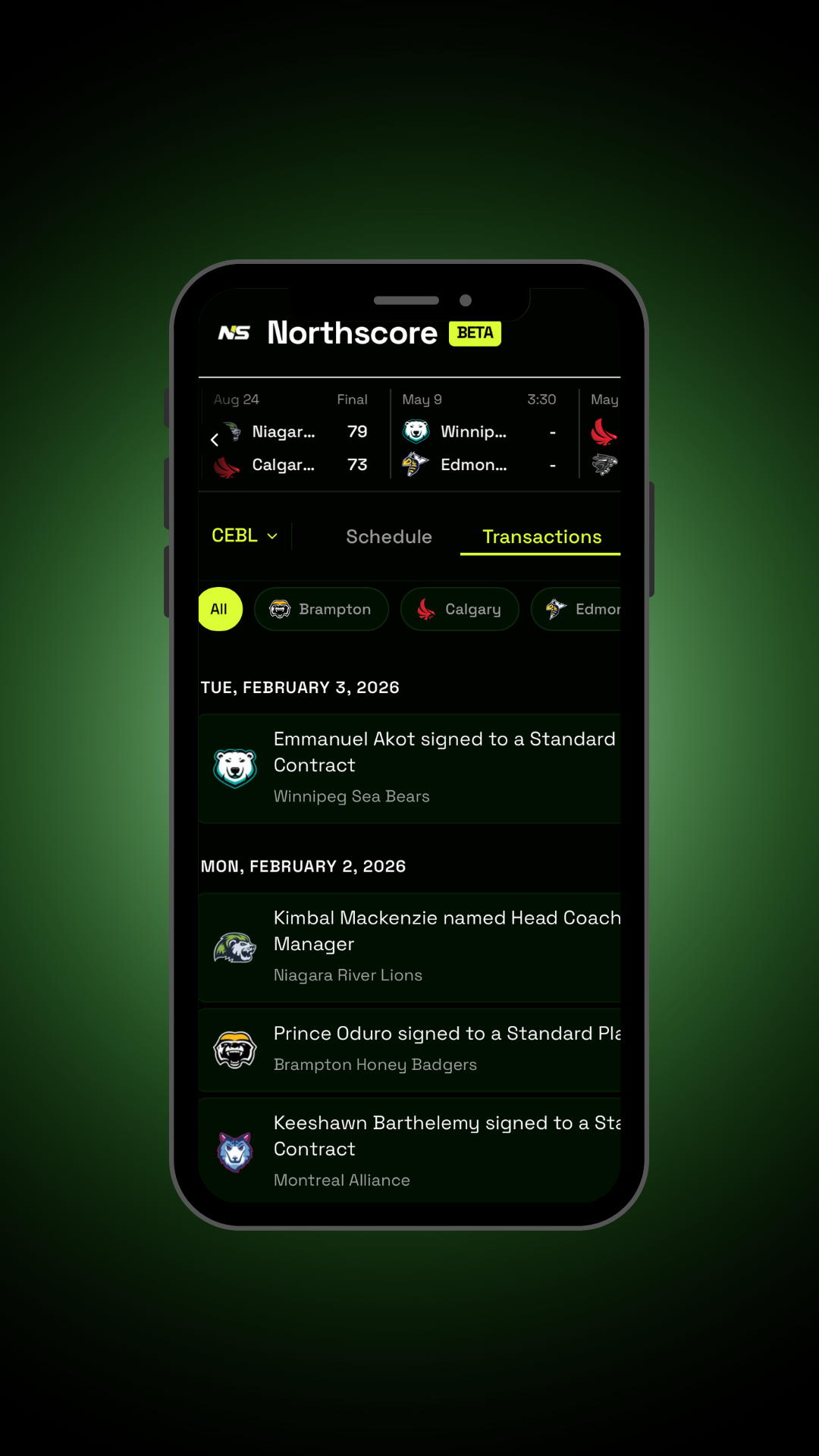
Live stats & standings — Game data updates automatically across 50+ leagues. You're always seeing current standings and results for professional, collegiate, and university sports.
Aggregated content — Articles, podcasts, and YouTube videos from Canadian sports media show up in one feed. No need to jump between websites.
Installable anywhere — Install it from the browser on phones, tablets, iPads, MacBooks, desktops, and even VR headsets like Meta Quest. It behaves like a native app. No app store delays, no platform-specific builds.
Push notifications — Users can get push notifications when any of their favorite teams' games go live. Login to personalize content and add favorites. Keep up with your teams without checking manually.
System Architecture
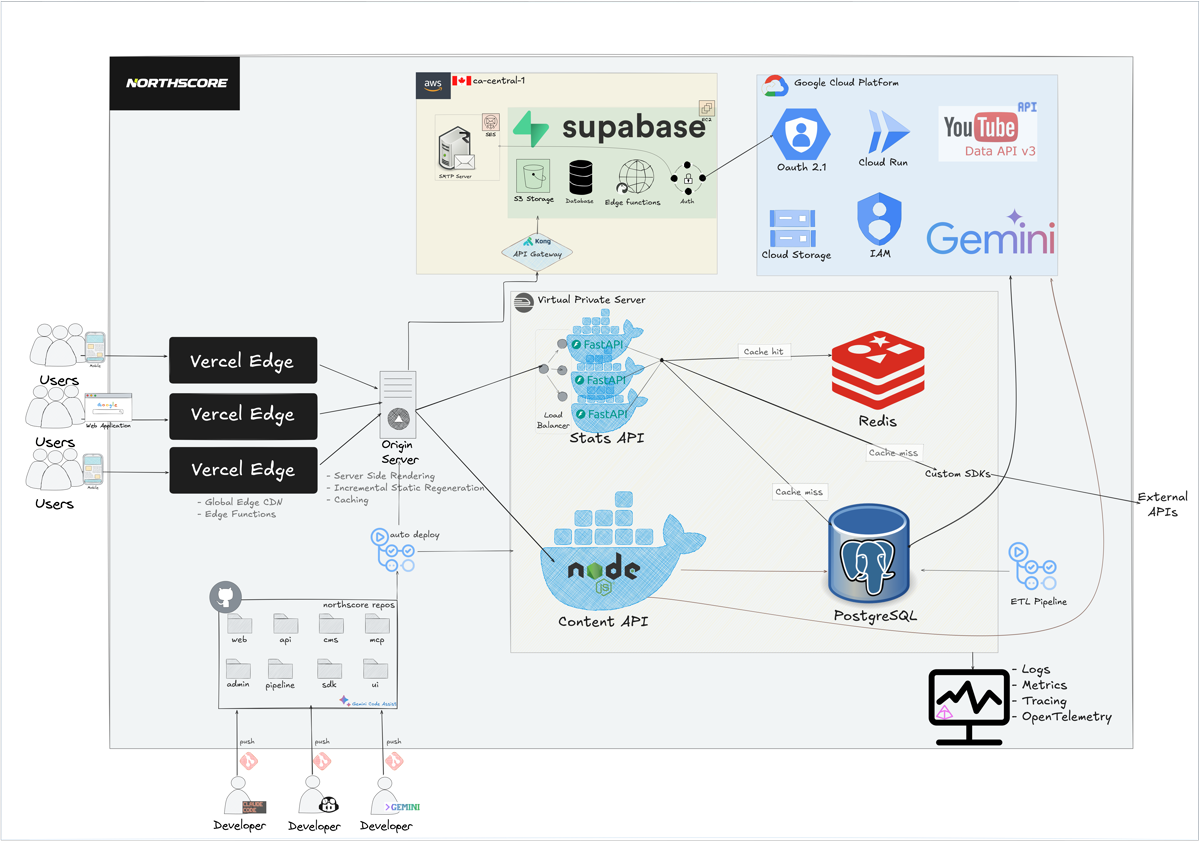
The system is built in three layers. Each one scales independently.
Frontend — The Next.js PWA is deployed to an edge CDN. This means the app shell is cached globally, users get fast initial loads, and there are no cold starts. The same codebase serves every device.
Backend — FastAPI and Node.js run as stateless containers handling stats and content requests. Supabase manages auth and user personalization data. When traffic spikes, stateless services scale horizontally. When traffic drops, they scale back down. I don't manage servers.
Data layer — PostgreSQL stores structured data. Redis handles fast cache reads. SQLite provides league-specific isolation when needed. Each tool does what it's good at.
Ingestion — Custom scrapers and API wrappers pull data from various sources and normalize it into a unified schema using the adapter pattern. Every league, whether it has an external API or requires scraping, maps to the same generic schema. The frontend doesn't care where data came from — it's all the same shape by the time it arrives.
One Codebase, Every Device
I chose a PWA over native apps for a simple reason: I'm one person.
Building separate iOS, Android, and web apps would mean maintaining three codebases, fixing three sets of bugs, and managing three deployment pipelines. That's not realistic for a solo project.
Instead, one Next.js app runs everywhere — phones, tablets, iPads, MacBooks, desktops, even VR headsets like Meta Quest. There are no app store approval delays. Updates are instant for all users. The same code runs on every device.
How Data Flows
User launches the PWA on their device
Edge CDN serves ISR-cached page (may be stale)
If revalidation needed, Stats API is called
Data retrieved from Redis cache (sub-10ms)
Normalized data sent back to the frontend
Fresh data renders, ISR/CDN cache updated
Hover over steps or click Play
Most requests never hit the database. The system is cache-first, so response times stay low even when traffic spikes.
When a user opens the app, the CDN serves the PWA shell. Then the app makes an API request. That request checks Redis first. If the data is cached, it's returned immediately. If there's a cache miss, the database gets queried, the response is normalized, and it's stored in Redis for the next request.
Cache TTLs are dynamic — off-season leagues get longer TTLs since data isn't expected to change frequently. The system keeps track of each league's active season and adjusts cache duration accordingly.
All timestamps from the backend are converted to UTC, allowing the frontend to display times in each user's local timezone. Canada spans six time zones, so handling this correctly ensures users always see accurate game times.
This keeps the Stats API p90 latency under 100ms, even on game days when traffic is high.
@app.get("/teams/{team_id}")
async def get_team(team_id: str):
    # Check cache first
    if cached := redis.get(team_id):
        return cached

    # Cache miss — query database
    team = db.fetch_team(team_id)
    redis.set(team_id, team, ex=300)  # 5 min TTL
return teamThe Data Problem
Canadian sports data is fragmented. Some leagues have external APIs. Most don't.
| League Source | Approach | Challenge |
|---|---|---|
| External APIs | SDK wrappers with type hints, validation & pagination | Inconsistent schemas |
| Web Scraping | Scheduled scrapers storing data in Postgres DB | Markup changes, uptime issues |
| No Data | AI-powered extraction from raw box scores | Manual validation, schema inference |
Leagues with external APIs — For leagues that provide external APIs, I built SDK wrappers with modern type hints, validation, and pagination. The CFL SDK is open source and handles proper error handling, retries, and schema validation automatically. Data is stored in Postgres, so if an API goes down, the app serves cached database data.
Leagues without APIs — For leagues without official data sources, I built custom scrapers that follow best practices — respecting rate limits and not overloading servers. Data is stored in Postgres immediately after scraping, so I don't need to scrape often. Scrapers also pause during off-seasons when there's no new data to collect.
Leagues with no infrastructure — Some leagues like HoopQueens had no data infrastructure at all. I created an AI-powered tool that takes raw box scores, auto-extracts the data schema using an agent, previews it for validation, and saves it to the database. What used to be manual data entry is now done in seconds.
Auth & Personalization
Northscore uses passwordless authentication. Users sign in with Google, Microsoft, or email OTP. No passwords are stored anywhere.
Supabase handles everything user-related: accounts, favorite teams, notification preferences, upcoming games tracking. The stats API doesn't know who you are. It just serves data. This separation keeps the architecture clean and makes the stats API fast — it's stateless and cacheable.
Onboarding is intentionally simple: install the app, sign up, enable notifications. Three steps. No friction.
Keeping It Running
Everything in the system is stateless. Services scale horizontally by default.
CI/CD — Every commit is linted, formatted, and tested automatically. Pull requests are reviewed with Gemini Code Assist to catch issues before they merge. If any check fails, the deployment is blocked. If a deployment introduces a breaking change, it rolls back automatically. This means I can ship often without worrying about breaking production.
Observability — Logs, traces, and Slack alerts catch issues before users notice them. When something breaks, I know immediately. When performance degrades, I get a notification. This makes debugging fast and keeps the app reliable.
Auto-healing — If a container crashes, it restarts automatically. If a service becomes unhealthy, it's replaced. There's no manual intervention required. The system is designed to recover on its own.
Technical Deep Dive
Why PWA instead of native apps?
Building separate iOS, Android, and web apps means maintaining three codebases, fixing three sets of bugs, and managing three deployment pipelines. As a solo developer, that's not realistic.
PWAs deliver:
- One codebase for all platforms
- Instant updates — no app store approval delays
- Offline support through service workers
- Push notifications without platform SDKs
- Installable like native apps on phones, tablets, desktops, and even VR headsets
- SEO benefits — pages are SSR and cached on CDN, so search engines (SEO), AI engines (AEO), and generative engines (GEO) can crawl and index content
The trade-off? Slightly less access to platform-specific APIs. But for a sports stats app, PWA capabilities are more than enough.
How does Redis caching work?
Every API request checks Redis first. If the data is cached, it's returned immediately (sub-10ms). If there's a cache miss, the database gets queried, the response is normalized, and it's stored in Redis with a TTL.
Cache invalidation happens in two ways:
- Time-based — Short TTLs (5 minutes) for live game data, longer TTLs for off-season leagues
- Event-based — Explicit cache clears when data is updated
The system tracks each league's active season and adjusts cache duration accordingly. This keeps p90 latency under 100ms even during peak traffic.
Northscore isn't built to look scalable. It's built to stay simple as it scales.
There's still a lot to improve. Better personalization. More leagues. Smarter notifications. An arcade section with leaderboards. But the foundation is solid. And that's what matters.
Try it out: northscore.ca